
When a user is granted Can Edit permissions for a specific plan, they act as the Plan Manager. Typically this user persona has a Manager role in Cascade. Their ability to edit and update goals are determined by the scope of the plan itself, rather than their individual ownership of specific items.
- Settings: You can adjust any plan settings (including name of plan, permissions, alignment, addition of custom fields, default time horizon)
- Visibility: You have full visibility into the entire contents of the plan.
- Editing: You can add new goals and edit all existing goals goals in the plan, even if you are not listed as a Collaborator or Owner, and use the plan tools (reorder plan, bulk select)
For example, let's look at a Manager, Lucia  who owns the Team objective. Note the underlying KPI and deliverables each have a different owner.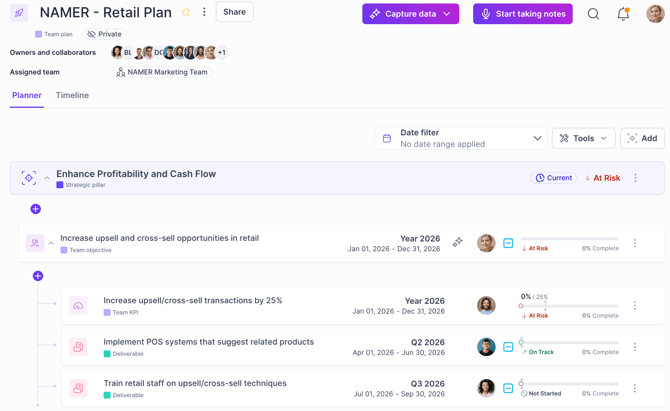
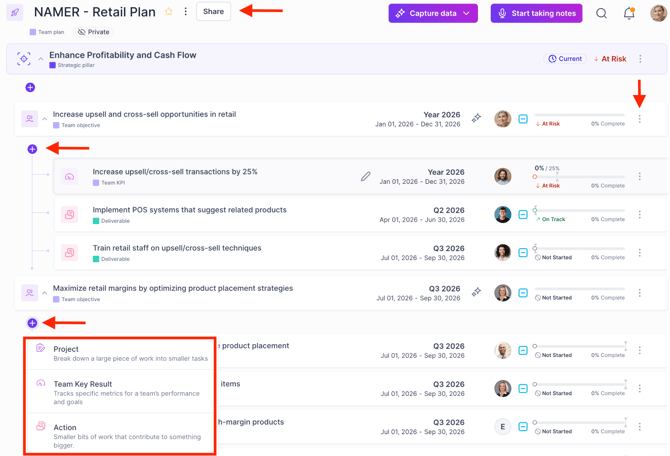
While Lucia specifically owns the Team objective, allowing her to add deliverables and KPIs to it alongside providing updates, she does not need ownership status to modify any other goals within the plan. She has full editing rights for the entire plan:
Users with Admin role inherit can edit access across all plans, regardless of permission