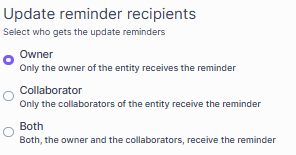
Workspace admins can choose who receives update reminders: the entity's Owner, its Collaborators, or Both. The setting applies to every entity in the workspace and is only available to admins in Workspace settings.
Why use it
Reminders reach the people who actually write the updates. Many workspaces assign ownership of goals and projects to executives, while someone else on the team posts the progress updates.
With this setting, keep the executive as Owner, add the team members who do the updating as Collaborators, and set reminders to go to Collaborators. The executive stays accountable without receiving reminders they won't act on.
How to change who gets reminders
You need workspace admin access.
- Open Workspace settings.
- Find the Update reminder recipients section.
- Select Owner, Collaborator, or Both.
The new setting applies to all update reminders in the workspace from then on.