
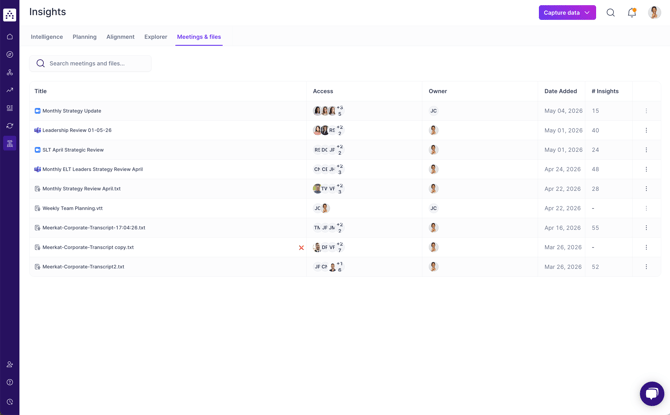
Meetings & Files is your personal hub in Cascade for everything Tapestry AI has learned from your work. It brings together:
- Connected meetings — automatically processed from Teams, Google Meet, or Zoom via Tapestry Connect
- Uploaded files — transcripts or notes you've added manually
- AI-generated insights — the facts, gaps, and decisions Tapestry has extracted and linked to your goals
Think of it as Tapestry's working memory. Everything here feeds directly into the update suggestions you see on your goals, the insights history tab and upcoming AI capabilities.
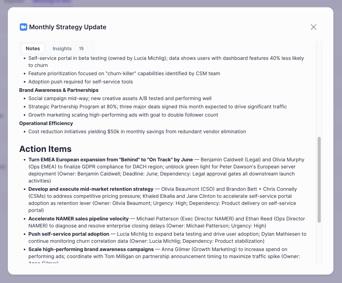
Understand exactly what happened in the meeting
See a short summary of the topics discussed in the meeting, the Action Items, the Captured Decisions and Open Questions. All automatically generated from your upload or transcribed meeting from an integration.
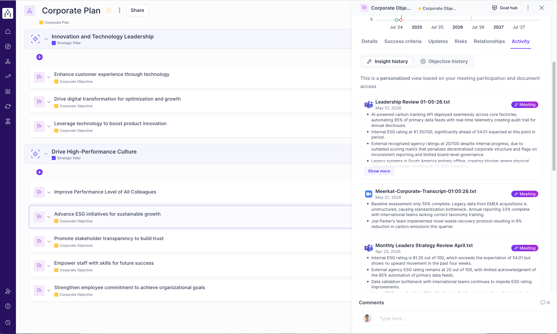
Insights directly on goals
Understand how you arrived at today with the insights history timeline. Stitching together insights from Meetings & Files to provide a history of decisions, blockers and wins on all matching objectives.
Getting Started
How does Tapestry Connect work?
When you connect your meeting platform (Teams, Meet, or Zoom), Tapestry monitors meetings where you're a participant. Once a meeting ends, it automatically pulls the transcript, maps the discussion to your goals in Cascade, and extracts relevant facts — usually within a few minutes.
Nothing gets posted automatically, this is your personal knowledge base. Only the participants in a meeting gain access to the insights from that meeting. Every suggestion goes through you first.
What if I don't want to connect my Team, Zoom or Meet account?
No problem. You can upload transcripts or meeting notes manually using the Upload File button in the hub. Tapestry will process them the same way and generate insights from them.
What file types can I upload?
Tapestry currently supports plain text files and common transcript formats. Support for PDF, PPT, DOCX, XLSX and many other common document formats is coming soon.
How quickly do meetings appear after they finish?
Usually within an hour of the meeting ending, provided the transcript is available from your platform.
A meeting is missing. What should I do?
First, check that your Tapestry Connect integration is still active from your connected accounts. If the connection looks healthy but the meeting still isn't there, you can upload the transcript manually as a workaround.
Insights & Suggested updates
What are "insights"?
When Tapestry processes a meeting or file, it extracts three types of information:
- Facts — concrete things discussed that relate to your goals (e.g. a milestone completed, a number mentioned)
- Gaps — areas where your goals lack recent context
- Decisions — action items or choices that came out of the discussion
These are classified by confidence, sentiment, and whether they relate to past, present, or future activity.
Where do I actually use these insights?
Head to any of your goals and open the update draft. Tapestry will suggest bullet points drawn from your recent meetings and files. You review them, edit anything you want to change, and post when you're happy. Nothing goes live without your approval.
Privacy & Security
Can my Cascade Administrator see my meetings?
No, unlike plans where Cascade administrators can jump in and help manage your plan, your meetings are yours and unless they appear in the access list (participant in the meeting) they won't even know it exists.
Can I delete something that shouldn't have been uploaded?
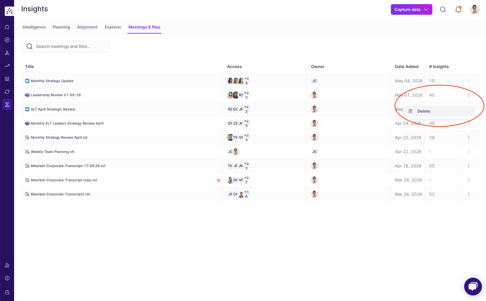
Deleting from the Meetings & Files hub purges anything Cascade has stored against that meeting or file. Summaries, Notes and all Insights connected to goals will be deleted when the file is deleted.
To help put your mind at ease as well, the only users that will have had an opportunity to view the file, notes or related insights are those listed in the participants/access column.
It's easy to delete files from the ... menu on the right hand side.
Why can't I delete something?
If you didn't originally upload it, you won't be able to delete it. You'll need to speak to the Owner of the uploaded file and ask them to delete it. It's common to see meetings you were in attendance of that others have uploaded to the product.
Who can see insights on the insights tab?
Only those with access to the uploaded files or meetings can view raw insights from meetings against a goal. Every user will be presented with a scoped view to only the meetings and files they have access to.
How do I see insights on all goals, even for meetings I didn't attend?
We believe in a privacy first approach and won't ever change from that view.
However, we also love transparency and have an upcoming opt-in only feature to allow broader access to insights. However, this is an organisation wide opt-in and insights will still be scoped to the regular access rules, e.g. if you don't have permissions to see the goal, you won't be able to see insights related to it.
Troubleshooting
| Issue | What to try |
|---|---|
| Meeting not appearing | Check your Tapestry Connect integration is active; upload transcript manually if needed |
| Insights seem irrelevant | Check that the goals you own have clear, up-to-date descriptions — Tapestry uses these to match context |
| File stuck in "processing" | Wait a few minutes and refresh; contact support if it's been more than an hour |
| Update suggestions are empty | You may not have had any meetings processed recently, or you may not own any goals that are actively in progress — try a manual upload, or updating your goals. |
Have a question that's not covered here? Reach out via the in-app help chat or contact support@cascade,app or your Customer Success Manager.