
To help you scale your planning quickly, you can now duplicate Objectives, Measures, and Actions directly within the Planner. This allows you to replicate complex structures without starting from scratch.
How to Duplicate
-
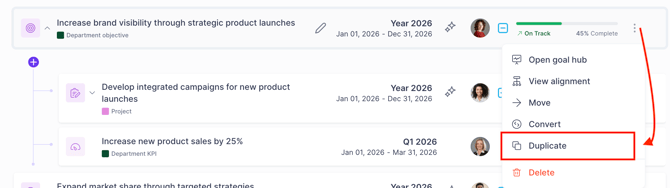
Locate the element (Objective, Measure, or Action) you wish to copy in the Plan.
-
Select the Duplicate option from the 3 dots
-
In the configuration window, you can:
-
Update the Title: Give your new element a unique name.
-
Adjust the Timeframe: Set a new start and end date
-
Duplicate nested items: When duplicating an Objective, you have the flexibility to copy just the top-level item or its entire hierarchy.
Note on Timeframes: If you change the timeframe of a parent Objective during duplication, the system will automatically update the timeframes of all included nested entities to match.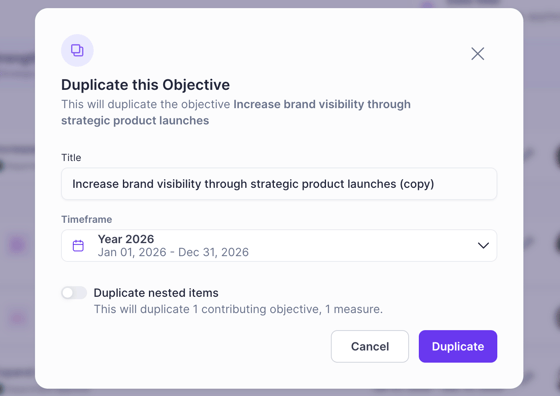
-
FAQs
What exactly is carried over when I duplicate an item?
This includes the Title (which you can edit), Description, Owners/Collaborators, status, tracking setup (for actions/measures) and any associated custom fields configurations. If you choose to include nested items, their structure is copied as well.
What IS NOT duplicated?
-
Progress: All new items start at 0%
-
Activity: Comments, text updates, and history logs are cleared.
-
Success Criteria (for nested items): Currently, while the nested objectives/projects themselves are copied, their specific success criteria are not.
When is the best time to use the Duplication feature?
Duplication is most effective when you are transitioning between planning cycles (such as starting a new Fiscal Year) but want to retain the same goals.
Does duplicating an item create a "link" between the old and new one?
No. Once the duplication is finished, the newly duplicated element is entirely independent. Changes made to the original will not affect the copy, and vice versa.