
You can make changes in bulk to multiple goals on any plan.
Bulk editing is available under the tools menu on any plan. This allows you to select multiple goals and perform bulk changes against them.
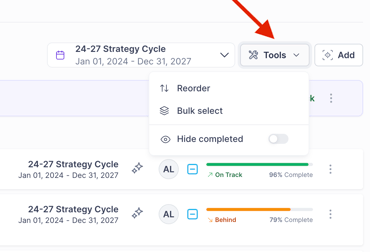
Reorder
Select 'Reorder' to rearrange plan components - please visit this guide for more details.
Bulk Select
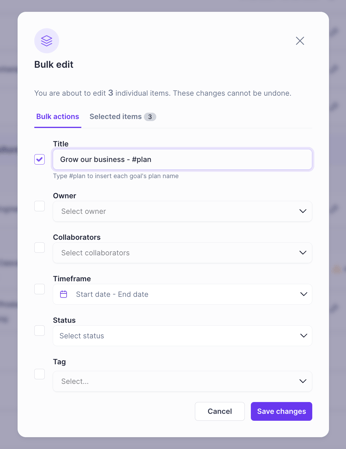
You can easily make changes to:
- Titles
- Owners
- Collaborators
- Timeframe (start/end date)
- Status
- Tags
Advanced Title Renaming
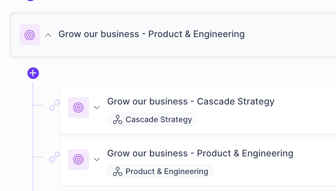
If you're looking to change a collection of goals with the same title across multiple plans, the Plan Title can be programatically applied. By using the #plan variable in the bulk editor you can bulk rename multiple goals to dynamically include the plan name they belong to.
e.g. "Grow our business - #plan", will result in each goal being renamed to include the plan name.
Hide Completed
Toggle "Hide Completed" to clear finished goals from your view. This won't delete your progress—it simply filters the noise so you can stay focused on what’s active.
FAQ
How many things can I edit at once?
We allow edits of 125 items at once. For making bulk changes to more than 125 items, we recommend using our API, or contacting our support/CS team.
Why can't I convert some goals?
We don't allow conversion of goal types that contain nested items, e.g. objectives with children to prevent accidental deletion of nested data.